SLayer 0.2: Queries That Build on Queries

•
April 16, 2026
By Egor Kraev
Semantic layer for agents, part III
The previous installments made the case for routing agent data queries through a semantic layer — a formal language for intent that compiles deterministically to correct SQL.
SLayer 0.2, which we just released, is where this gets practical: models can reference each other, queries can feed into queries, and agents can answer multi-step analytical questions without constructing nested SQL by hand.
Here’s what shipped.
Joins and cross-model queries
0.1 operated on single tables. That’s fine for simple questions, but real analytical queries span multiple tables — revenue by region means joining orders to customers to regions.
SLayer 0.2 adds formal join definitions between models, resolved automatically at query time by walking the join graph. Cross-model dimensions use dot syntax:
{
  "dimensions": ["customers.name", "customers.regions.country"],  "fields": ["revenue:sum"]
}
Multi-hop paths like customers.regions.country just work — SLayer traces the join chain and builds the SQL.
Cross-model measures also use dot syntax (customers.revenue:sum), but each runs in its own sub-query, so JOIN fan-out can't inflate your aggregations. If you've debugged a 3x revenue number caused by a many-to-one join, you know why this matters.
When the same table is reachable via different paths — say, orders → customers → regions AND orders → warehouses → regions — path-based aliases (customers__regions vs warehouses__regions) keep things unambiguous.
Auto-ingestion converts your database schema to a collection of joined models.
Tutorials: Joins, Joined Measures.
Queries as models
This is the feature I’m most excited about.
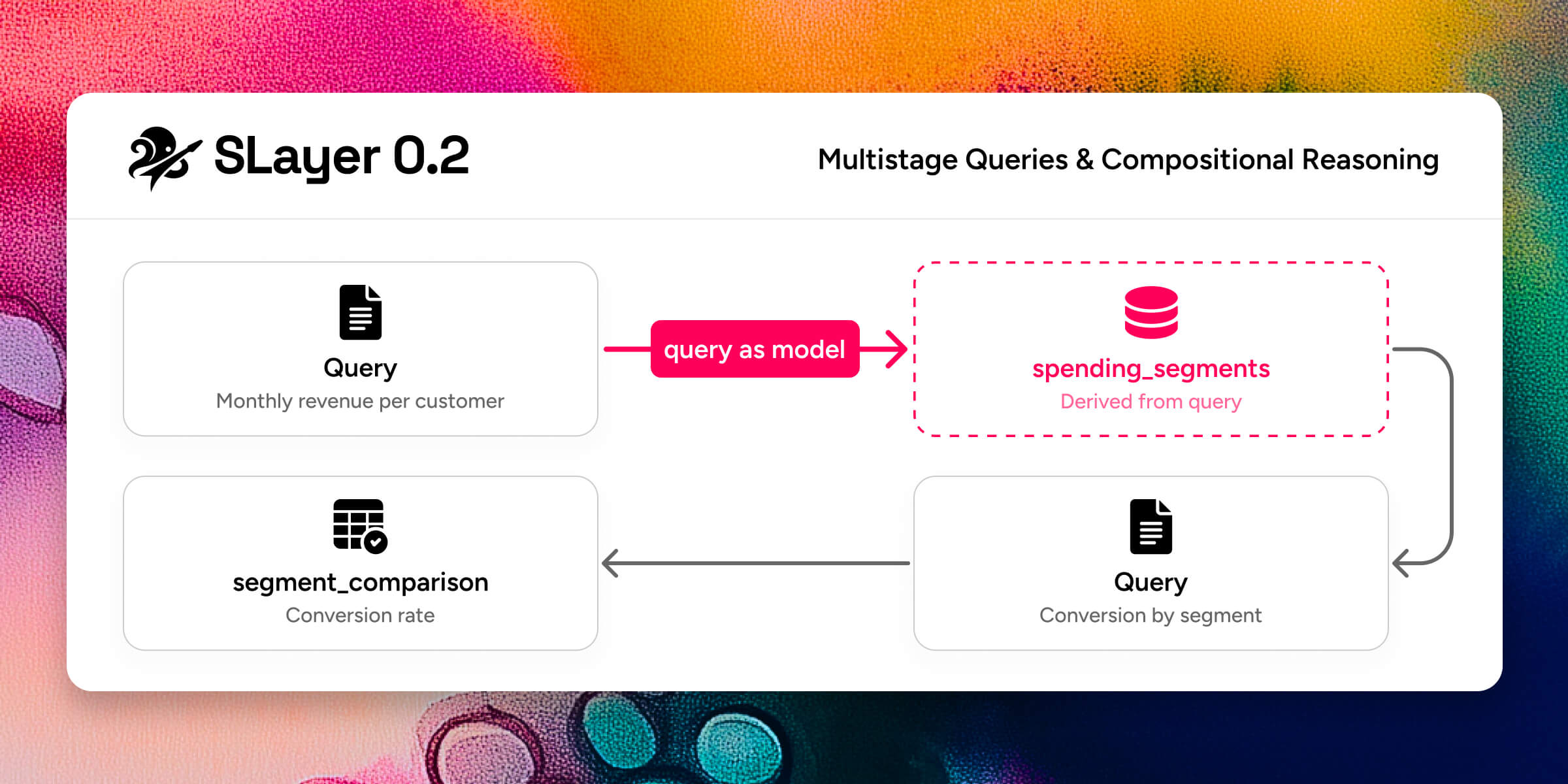
A single query can answer “monthly revenue by region.” But “segment customers by spending trend, then compare conversion rates across segments” requires the output of one query to become the input of another. In raw SQL you’d write nested CTEs or temp tables. With an agent, you’d hope it gets the nesting right (it often doesn’t).
SLayer 0.2 lets you to treat any query as a new model. The result columns become the new model’s dimensions and measures. From there, you query it like any other model — add dimensions, apply filters, join it to other models.
In addition, you can extend an existing model with extra dimensions, measures, or joins inline at query time, without modifying the stored definition. Useful when an agent needs a one-off calculated column that doesn’t belong in the permanent model.
The combination means agents can reason compositionally. Break a complex question into steps, define each step as a query, and feed results forward. The semantic layer validates each step independently, so errors surface early and localized — not buried in a 200-line SQL string.
Tutorial: Multistage Queries.
Measures and aggregations, separated
Most semantic layers fuse the measure and its aggregation: revenue_sum, revenue_avg, revenue_min, revenue_max — four definitions for one column, repeated across every numeric field.
In SLayer 0.2, a measure is just a named row-level expression:
measures:
- name: revenue
sql: amount
Aggregation is chosen at query time with colon syntax and optional parameters: revenue:sum, revenue:weighted_avg(weight_col), *:count. One measure definition, used with any aggregation you need.
Eleven built-in aggregations cover the common cases (sum, avg, min, max, count, count_distinct, first, last, weighted_avg, median, percentile). For anything else, define custom aggregations at the model level with SQL templates — weighted averages with model-specific defaults, trimmed means, whatever your domain needs. Per-measure allowed_aggregations whitelists keep nonsensical combinations (like customer_id:avg) from reaching the database.
Tutorial: Aggregations.
Time operations
SLayer’s time transforms — time_shift, change, change_pct, last — shipped in 0.1, and the Time Dimensions tutorial covers them in detail. They remain some of the highest-leverage features: a filter like last(change(revenue:sum)) < 0 ("only groups where revenue declined in the most recent period") is a one-liner that compiles to a multi-CTE query with self-joins. In 0.2, these compose cleanly with the new colon aggregation syntax and cross-model measures.
Also in 0.2
Model filters — always-applied WHERE conditions ("deleted_at IS NULL") that you define once and never forget to include.
DuckDB joins SQLite and Postgres as a Tier 1 fully-tested database, with no Docker required. All tutorials run on DuckDB out of the box.
Simpler query syntax — dimensions, measures, and ordering accept plain strings. The Python client accepts dicts. Same JSON works across REST API, MCP, and Python SDK.
SQL-style filters — =, <>, IN, IS NULL, multi-hop paths (customers.regions.name = 'US'), and computed-column references (change(revenue:sum) > 0).
Query introspection — dry_run previews generated SQL without executing; explain shows execution plans.
Try it
pip install motley-slayer[all] and work through the tutorials — eight walkthroughs with companion Jupyter notebooks, all running on DuckDB with bundled sample data. No Docker, no cloud credentials.
Full docs: motley-slayer.readthedocs.io